McKinsey Redrock Study: Complete 2026 Guide to Phases, Math, and Strategy
Redrock Study is the first game you encounter in the McKinsey Solve assessment, and the most time-pressured. You have 35 minutes — a separate timer from Sea Wolf — to work through a two-part research and analysis exercise that eliminates the majority of candidates before they ever speak to a McKinsey interviewer.
It looks like a science project about wolves and elk on a fictional island. It isn't. It's a structured data analysis exercise dressed in an ecological theme, and the cognitive work it demands is almost identical to what McKinsey consultants do every day. Once you see it that way, it becomes a lot more approachable — and a lot more preparable.
You may see it referred to as the Redrock Study Task, Redrock Island, or simply Redrock. These all refer to the same module.
What Redrock actually is — and what it isn't
The surface-level framing: you're a researcher investigating a wildlife population scenario. You'll see data about animal populations across geographic regions — typically something like wolf packs and elk across different areas of a fictional island. The specific animals and exhibits change between simulations, but the task structure is always the same.
The real framing: you're a junior analyst who has been handed a research question and a pile of raw data. Your job is to identify what's relevant, run the calculations that answer the question, and present the findings clearly. That is, word for word, what a first-year McKinsey consultant does on an engagement.
How Redrock resembles a consulting case
The parallels are direct:
- You receive a research objective and a data set — the same way a consultant receives a client brief and a data room.
- You have to filter signal from noise — deciding which data points matter and which are irrelevant padding.
- You run calculations to answer specific questions — the quantitative backbone of any analysis.
- You synthesise findings into a short report — the same as a client-ready slide or memo.
- You answer six independent mini-cases under time pressure — structurally identical to the rapid quantitative questions in a live case interview.
How Redrock differs from a case interview
- No business knowledge required. Where a case interview might ask about market sizing or margin analysis, Redrock asks about population growth rates and habitat distributions. The math is identical; the vocabulary is different. The ecological theme is deliberately neutral — no candidate has a prior-knowledge advantage.
- No frameworks. You won't use MECE, issue trees, or any case structure. There's no blank-page problem structuring. You have a defined objective, a set of data, and a calculator.
- It's linear and one-directional. A case interview is a conversation you can navigate. Redrock moves forward through sequential phases. Once you advance past Investigation, you cannot go back. What you missed is gone.
- The behavioural score matters more here than anywhere else in Solve. More on this below.
The mindset to adopt: you are not here to impress anyone with creative insight. You are here to read data correctly, calculate accurately, and report results clearly. Correctness over cleverness.
The two-part structure
Redrock has two distinct parts, completed within a single shared 35-minute timer.
Part 1 — The Study: three sequential phases (Investigation → Analysis → Report). These are one connected task — the output of Investigation feeds Analysis, and Analysis feeds Report. Errors compound forward.
Part 2 — The Cases: six independent mini-cases, each with its own self-contained exhibit and question set.
The transition between Study and Cases is one-way. Once you submit the Report, you move into Cases and cannot return to the Study. Critically, the Cases use entirely different data from the Study — so if your Study went badly, Cases are a genuine fresh start. And if your Study went well, Cases are an independent points opportunity that you absolutely cannot afford to let run out of time.
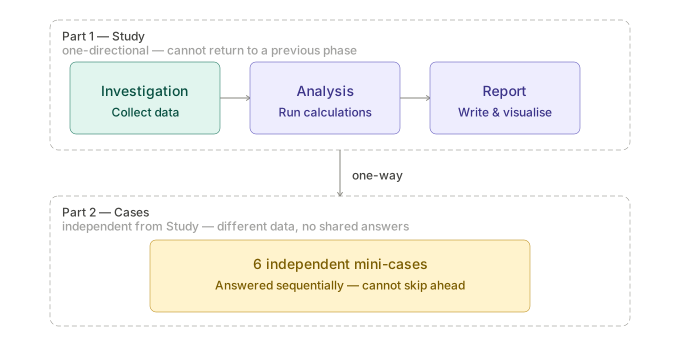
Part 1 (Study) flows one-way into Part 2 (Cases); you cannot return to the Study after submitting the Report.
Part 1 — The Study
Phase 1 — Investigation
Investigation is where you collect the data you'll use for the rest of the Study. You receive the full scenario: a written brief describing the research context and objective, plus a set of charts, tables, and graphs. Your job is to identify the relevant data points and drag them into the Research Journal.
The Research Journal. The Journal is your workspace for the rest of the Study. When you drag a data point in, it appears as a labelled card. You can rename each card to something meaningful — "Year 1 wolf population, Region A" rather than the auto-generated label. You can reorder cards to group related data. You can mark individual cards with an importance flag to highlight the ones most critical to your analysis. Data in the Journal can be fed directly into the calculator or dragged into answer fields in Analysis and Report. Take the time to organise it well — a clean, well-labelled Journal saves significant time in Analysis.
The core discipline: read the objective first. Before touching any data, read the research objective and skim the Analysis questions. The questions tell you exactly what calculations you'll need to run. Work backwards to identify which numbers those calculations require, and collect only those numbers. Roughly 10–15% of the data in a Redrock scenario is actually needed. The rest is noise — deliberately included to test whether you can distinguish relevant from irrelevant.
On noise. About half of all information in a Redrock scenario is irrelevant to the objective. This mirrors the real consulting experience of receiving a data room full of client materials. Collecting too little leaves you unable to answer Analysis questions — the only way to recover is to return to Investigation, which costs time and signals an unstructured approach in your process score. Collecting too much clutters the Journal, slows your Analysis lookup, and signals poor prioritisation. Target around 8–12 well-labelled cards for a typical scenario.
Watch for anomalies. Outliers — a population that suddenly drops, a region that behaves differently from the others — often signal the key insight the analysis is built around. Flag them when you see them.
Phase 2 — Analysis
Analysis presents 3–5 quantitative questions, sometimes with sub-questions, using the data you collected. Each answer is entered using the on-screen calculator.
The questions build on each other. An answer from question 1 typically feeds into question 2 or 3 — which is why compounding errors from rounding intermediate results is such a common failure mode. The calculator logs every result as an unrounded value that you can drag directly into the next calculation. Always chain calculator outputs rather than re-entering rounded numbers. This both reduces error and produces the clean calculation chain that the process score rewards.
The types of calculations you'll encounter are covered in the math section below. The challenge is not the mathematics — it's setting up the right equation quickly, identifying the right inputs from your Journal, and executing accurately under time pressure.
Answer accuracy here has downstream consequences. Your Analysis answers populate the Report blanks. A wrong answer in Analysis produces wrong blanks in Report, and there's no way to fix them once you've moved on.
Phase 3 — Report
Report has two components:
Written report. A template with approximately 8–10 blanks. These are filled with your Analysis results plus a few comparative judgements — "higher," "lower," "increased by X%," and similar. If Investigation and Analysis went cleanly, this is largely a matter of dropping in your logged answers. The Report is not the place to discover that you collected the wrong data.
Chart. You choose a chart type and fill in the values. The chart type selection is one attempt only — you cannot revise it. Know the rules before the test:
- Bar chart — comparing distinct categories at a single point in time
- Line chart — showing change or trend over time
- Pie chart — showing the composition of a single whole
If you are comparing four geographic regions at one snapshot in time, that's a bar chart. If you are showing how a population changed over five years, that's a line chart. If you are showing what percentage of a total each region represents, that's a pie chart.
On returning to previous phases. Technically possible from Report, but it signals an unstructured approach in the process score and consumes time you can't spare. The goal is to have everything you need before advancing to Report — not to discover gaps after arriving there.
Part 2 — The Cases
Six independent mini-cases, each with its own exhibit and one or two questions. They are thematically related to the Study scenario but use entirely different numbers — your Study Journal is not relevant here.
You answer them sequentially and cannot skip ahead. Question types across the six cases include:
- Percentage and percentage-point calculations
- Weighted averages
- Basic probability
- Formula identification — selecting the correct equation from multiple options
- Verbal reasoning — true/false or best-description based on a given text excerpt
- Data interpretation — finding the mean, median, or mode from a chart or table
- Chart type selection
The Cases are independently scored from the Study. This means a strong Cases performance can partially offset a messy Study, and vice versa. Many candidates who prepare well for the Study forfeit Cases points simply by running out of time — the most preventable failure in Redrock.
Never let the Study consume more than 25 minutes. That leaves at least 8–10 minutes for Cases, which is enough to answer all six if you're prepared. Give each case roughly 90 seconds. If one is taking too long, make your best guess and move on — a wrong answer on one case costs less than two blank answers.
The behavioural score — why Redrock is where it matters most
As covered in our dedicated behavioural score article, McKinsey evaluates you on two dimensions: your product score (what you decided) and your process score (how you got there). Redrock is where the process score is most consequential — significantly more so than Sea Wolf, whose more constrained interface generates less varied behavioural signals.
What McKinsey's system tracks specifically in Redrock:
- How many items you drag into the Journal. Too few suggests incomplete analysis. Too many suggests an inability to filter relevance.
- Whether you use the on-screen calculator for every calculation. Including easy ones you could do mentally.
- Whether you chain calculator outputs across steps rather than re-entering rounded values.
- How often you revise answers or return to previous phases. Excessive reversals signal indecision.
- Time distribution across phases. Spending 20 minutes in Investigation suggests difficulty identifying what matters.
- Decision consistency. Applying the same logic to similar problems signals structured thinking.
The single most important behavioural habit is using the calculator for everything. Every calculation, no matter how simple, should go through the on-screen calculator. Not because McKinsey doubts your arithmetic — but because the calculator is the only channel through which your analytical process is visible to the scoring system. A correct answer entered without any calculator activity is, from the system's perspective, an answer that arrived from nowhere. That produces a weak process signal regardless of whether the answer is correct.
Pen and paper are fine for rough notes and for planning your equation structure before touching the calculator. But the actual computation always happens on-screen.
Two candidates can submit identical correct answers and receive meaningfully different overall scores because one used a structured, traceable process and the other didn't.
The math you actually need
Roughly 60–70% of Redrock questions involve quantitative reasoning. The mathematics is not advanced — it's speed and accuracy that matter, not complexity. These are the concepts that appear:
Percentage change. (new − old) / old × 100. Fast and frequent. Know it automatically.
Percentage vs. percentage points — the most common error in Redrock. These are different things. "Increased by 5 percentage points" means you add 5 to the percentage: 10% becomes 15%. "Increased by 5%" means you multiply: 10% becomes 10.5%. One calculation appears constantly in Redrock; knowing which one to apply is a genuine differentiator.
Weighted averages. Multiply each value by its weight, sum the products, divide by the total weight. Watch for cases where the weights don't sum to 100% — in those cases, divide by the sum of the weights themselves, not by 100.
Example: three groups with values 40, 60, and 80, with weights 2, 5, and 3. Weighted average =
(40×2 + 60×5 + 80×3) / (2+5+3)=(80 + 300 + 240) / 10= 62. If weights were instead 2, 5, and 4 (summing to 11, not 10): divide by 11, not 10.
Growth rates. Simple total growth: (end − start) / start. Compound annual growth rate (CAGR): (end / start)^(1/n) − 1, where n is the number of periods. Know which one the question is asking for — they give different answers.
Mean, median, mode. Mean = sum divided by count. Median = middle value when ordered (average of two middle values if even count). Mode = most frequent value. All three appear in mini-cases, often drawn from a chart rather than a clean list of numbers.
Basic probability. P(A and B) = P(A) × P(B) for independent events. P(A or B) = P(A) + P(B) − P(A and B). Appears in mini-cases, not the Study.
Ratios and proportions. Straightforward cross-multiplication. Frequent and fast.
One rule that applies to all of it: never round intermediate results. Use the calculator's logged unrounded outputs as inputs to subsequent calculations. Round only the final answer, and only if the question asks for it. Rounding mid-calculation is the most common source of cascading errors in Redrock.
Time management
Redrock has its own 35-minute timer, completely separate from Sea Wolf. Minutes saved in Redrock do not carry over.
Suggested time allocation based on candidate community data:
| Phase | Target time |
|---|---|
| Investigation | 7–10 minutes |
| Analysis | 10–12 minutes |
| Report | 4–5 minutes |
| Cases | 8–10 minutes |
The most common failure mode is not running out of time overall — it's letting Investigation and Analysis expand until Cases get 3–4 minutes. Six independent questions in 3 minutes is a forced guess on most of them. That is a fixable problem with practice.
If you're running behind after Analysis: keep Report tight (you have the answers already, it's assembly work), and protect the Cases allocation. A slightly rushed Report is far better than four blank Case answers.
The most common Redrock mistakes
- Reading all the data before reading the objective. This costs 3–5 minutes on irrelevant material and is the most common Investigation error.
- Over-collecting in the Journal. More than ~12–15 cards in most scenarios indicates poor filtering. Cluttered Journal, weaker process signal.
- Rounding intermediate results. Compounds errors forward into Report. Chain unrounded calculator outputs instead.
- Not using the calculator for simple calculations. The most consequential behavioural mistake.
- Confusing percentage change and percentage points. One wrong interpretation cascades into at least two wrong answers.
- Choosing the wrong chart type. One attempt only. Know the rules cold before test day.
- Running out of time before Cases. Fixable entirely through pacing discipline. Cases are independently scored — always worth protecting.
- Returning to Investigation from Report unnecessarily. Costs time and registers as an unstructured process.
How to prepare
Redrock is one of the more directly preparable parts of Solve. The skills it tests are real analytical skills that improve with deliberate practice.
Drill the math. Percentages, percentage points (know the difference), weighted averages, and growth rates should be automatic before test day. Practice calculating them quickly by hand to build the muscle, then practice using a calculator to chain multi-step problems. GMAT Integrated Reasoning problems are a useful analogue — similar question style, similar time pressure.
Practice selective data reading. Give yourself a dense chart or a table of data and a specific question. Practice extracting only the relevant numbers in under 60 seconds. The discipline of reading the objective before the data is counterintuitive at first — most people want to absorb the data first — but it is significantly faster once it becomes a habit.
Memorise chart type rules. Bar, line, pie. Know cold which scenario calls for each. The Report phase gives you one attempt at the chart type — this should be a two-second decision, not a deliberation.
Run full timed simulations. The 35-minute pressure is real and only feels familiar with practice. Isolated phase drills help build skills; full runs build pacing. Do both. SeaWolfPrep's simulator includes Redrock scenarios across varying difficulty levels with post-run analytics.